Create It Your Way.
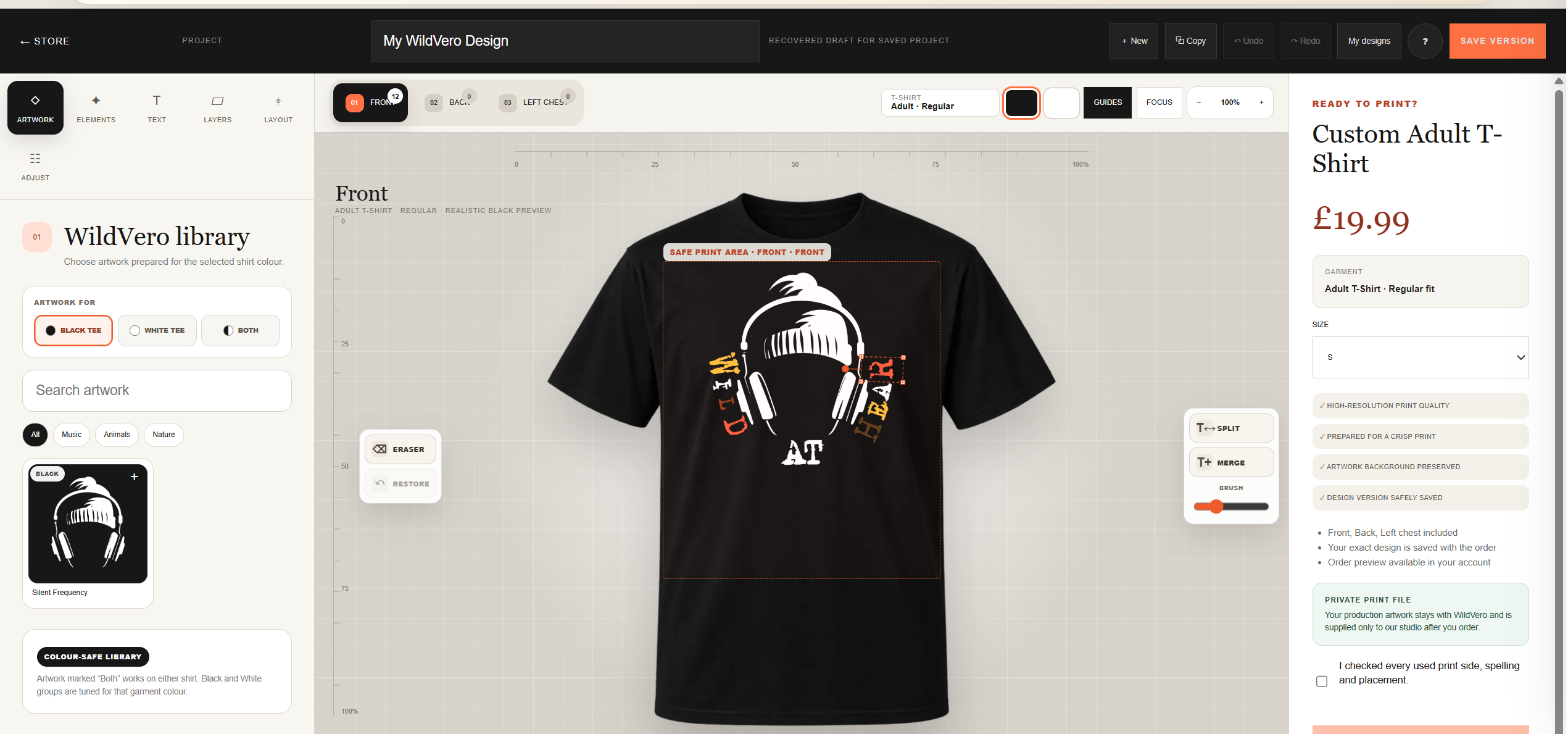
Meet the WildVero Custom T-Shirt Studio — our interactive design space where you can choose WildVero artwork, add text, arrange your design and preview your personalised T-shirt before ordering.
Your idea. Your layout. Your T-shirt.
At WildVero, we believe clothing should carry more than a print. It should carry a little personality, a little adventure and, sometimes, a story that belongs only to you.
That is why we created the WildVero Custom Studio directly inside our online store. No complicated graphic software. No specialist design knowledge. Just choose, create, preview and order.
What is the WildVero Custom Studio?
A creative workspace built into WildVero.co.uk, designed to make personalising a T-shirt simple, visual and enjoyable.
Choose Artwork
Browse the WildVero artwork library and select graphics prepared specifically for use on our garments.
Add Text
Combine artwork with your own text and build a composition that feels more personal.
Move & Resize
Adjust placement and scale directly on the garment preview until the composition feels balanced.
Use Layers
Work with individual design elements without having to rebuild your entire composition.
Save Designs
Save your project versions and return to your ideas when inspiration strikes again.
Preview Before Ordering
See your design on a realistic T-shirt preview before it reaches our production studio.
Start with WildVero artwork.
Inside the Studio you will find a growing library of graphics prepared for custom WildVero products.
Browse available artwork by category, including themes such as Music, Animals and Nature, or use the search tool when you already know the kind of design you want.
Artwork can also be prepared specifically for black T-shirts, white T-shirts or for both colours. This helps maintain contrast and keeps the finished design looking clean and intentional.
More than just the front.
The WildVero Studio lets you work with several print positions. Each area can be designed independently, so one T-shirt can carry a complete visual idea rather than a single fixed graphic.
See the design before we print it.
Your artwork appears directly over a realistic T-shirt preview. This makes it much easier to judge its size, position and overall balance.
A design that looks enormous on a blank computer screen may look perfectly natural on a garment — and sometimes the opposite is true. The Studio removes much of that guesswork before you place the order.
A small studio inside your browser.
The interface is designed to stay easy to use while still giving you meaningful creative control.
Layers
Keep different graphics and text elements organised while building more detailed compositions.
Undo & Redo
Experiment freely and quickly return to an earlier step when your latest brilliant idea turns out to be slightly less brilliant.
Eraser
Refine selected artwork and remove elements when the design needs a little extra adjustment.
Text Tools
Add lettering to your design and arrange it alongside the graphics you choose.
Split & Merge
Work with text elements in more flexible ways when creating custom lettering layouts.
Saved Versions
Save project versions so you can preserve an idea before experimenting with another direction.
“A good custom T-shirt is not always about adding more. Sometimes it is about knowing when the design is finished.”
WildVero StudioHow to create and order your T-shirt.
From opening the Studio to sending your design to our production workflow, the process is designed to stay straightforward.
Open the Custom Studio
Start a new design and choose your Adult Regular T-shirt.
Choose black or white
Select the garment colour you want to use as the base for your design.
Choose a print area
Work on the Front, Back or Left Chest and move between the available areas whenever you need.
Browse WildVero artwork
Search the library or explore categories and add the artwork you want to use.
Build your composition
Move and resize elements, add text and combine several pieces if you want something more individual.
Use guides and layers
Fine-tune the layout while keeping your artwork inside the intended production area.
Check every side
Review the Front, Back and Left Chest areas you have used before finishing the project.
Save your version
Save the design so your selected composition is preserved.
Choose your size
Select the required T-shirt size from the order panel.
Complete the final check
Check spelling, scale, position and every print side used in the project.
Continue to checkout
Your garment and custom project stay connected as you continue through the WildVero ordering process.
We prepare it for print
Once the order is confirmed, WildVero receives the design information required to prepare your personalised T-shirt for production.
One final look before ordering.
Personalised products deserve an extra moment of attention. Before confirming your order, take a careful look at the complete design.
Your design stays connected to your order.
An important part of the WildVero system happens behind the scenes. Your saved custom design information is associated with your order, allowing our studio to prepare the correct composition for production.
Private production artwork
Production artwork is handled by WildVero as part of the fulfilment process and supplied to our studio for producing your order.
You create the look. We take care of the production side.
Who is the Custom Studio for?
The Studio is ideal for anyone who wants something more individual than a standard ready-made T-shirt.
Create for yourself
Build a T-shirt around artwork and layouts that match your own style.
Create a gift
Make something more personal for someone who deserves more than another last-minute pair of socks.
Experiment
Try different combinations, save versions and discover a composition you may never have planned at the start.
Built for creativity.
WildVero grew from a fascination with graphics, nature, adventure and products with character.
The Custom Studio is a natural extension of that idea. Instead of offering only finished WildVero designs, we can now give customers the tools to combine selected artwork in their own way.
We provide the garment. We provide the artwork. We provide the production process.
You decide how the story comes together.
Custom Studio FAQ
Do I need graphic design experience?
No. The Studio is visual and has been designed so customers can create a layout without professional graphic software.
Can I design more than the front?
Yes. Available areas include Front, Back and Left Chest.
Can I add text?
Yes. Text can be added and arranged alongside selected WildVero artwork.
Can I save my design?
Yes. Project and version-saving tools allow you to preserve your work and return to saved designs.
Can I see what the T-shirt looks like before ordering?
Yes. Artwork is displayed directly on the garment preview so you can check scale and placement.
What happens after I order?
Your custom design information is kept with the order so our production workflow can prepare the correct artwork for your personalised garment.
Your next favourite T-shirt might not exist yet.
So create it. Explore the WildVero artwork library, experiment with layouts and turn your idea into something you can actually wear.
Create Your WildVero T-ShirtCreate it. Preview it. Save it. Wear it.
 04 Sep 2026
 13 Aug 2026

No published comments yet. You can be the first sensible voice in the room.